How to Check 9th Class Result When the Board Website Is Busy?

On 9th class result day, thousands of students may try to open the board’s result website at the same time. As a result, the page can become slow, show an error, or temporarily stop responding. If this happens, there is no need to panic.
You can first try the official result portal again after a short wait. If the board provides another official method, such as SMS or a result gazette, you can use that option instead. The available methods depend on your educational board.
Why Is the 9th Class Result Website Busy?
The main reason is usually the sudden increase in visitors after the result is announced.
Thousands of students may enter their roll numbers within the same few minutes. This can put heavy demand on the board’s website and result database.
You may experience:
- Slow page loading
- Website timeout
- Error messages
- A blank result page
- Difficulty submitting your roll number
- A page that keeps refreshing
- Temporary server unavailability
A busy website does not necessarily mean that your result is unavailable.
What Should You Do First?
If the board website is not responding, do not repeatedly refresh the page every few seconds.
Wait for a few minutes and try again. Before trying again, make sure you have selected the correct board, examination and year.
You should also keep your roll number slip nearby because entering an incorrect roll number can make it appear that your result is unavailable.
If you have not checked your result yet, you can use our 9th Class Result by Roll Number guide for the normal checking process.
Try the Official Result Page Again
The simplest solution is often to wait and try the official result portal again.
A result website can become temporarily overloaded immediately after the result announcement and return to normal when the number of requests decreases.
Instead of continuously refreshing the page, close the result tab, wait several minutes and open the official board result portal again.
Use the Board’s SMS Result Service
Some educational boards provide an SMS method for checking results.
If your board officially provides this service, it can be useful when the website is slow because you do not need to load the result webpage.
For example, FBISE currently allows students to obtain the 2026 SSC result through SMS by sending FB followed by a space and the roll number to 5050.
However, SMS codes are different between boards. Do not use the FBISE code for another board unless that board officially provides the same service.
Always check your board’s official instructions for the correct SMS number and format.
Check Whether Your Board Has Published a Result Gazette
A result gazette can be another option when an individual result website is difficult to access.
A gazette contains the results of many candidates, not just one student’s record. If the document is searchable, you may be able to use your roll number to find your result.
For example, BISE Multan maintains an official section for its SSC result gazettes.
The availability and format of the gazette depend on the board, so check the official website of your own board.
Try a Different Browser
Sometimes the problem is not entirely with the board’s server.
If the result page is not opening correctly, try another browser on your phone or computer. For example, you can switch between Chrome, Edge, Firefox or another updated browser.
This will not fix an overloaded board server, but it can help if the problem is caused by your browser, stored cache or a temporary page-loading issue.
Switch Between Wi-Fi and Mobile Data
If the website is not loading, try changing your internet connection.
For example, if you are using Wi-Fi, try mobile data. If mobile data is slow, try a reliable Wi-Fi connection.
This is particularly useful when the problem is caused by your own internet connection rather than the board’s website.
However, changing your connection will not solve a server-side outage. If thousands of students are facing the same problem, the best option is usually to wait and try again.
Try Checking the Result at a Less Busy Time
The busiest period is normally around the time when the result is first announced.
If you do not urgently need the result within the first few minutes, wait for the traffic to decrease and try again.
There is usually no advantage in refreshing the same page dozens of times while the server is struggling with a large number of requests.
Do Not Assume That “Result Not Found” Means You Failed
A result-related error does not automatically mean that you have failed.
If the website shows a message such as “record not found,” first check:
- Your roll number
- Selected board
- Examination year
- Class or examination type
- Whether the result has officially been announced
If all the information is correct and the result has been announced, try again later or use another official checking method provided by your board.
Don’t Keep Submitting the Same Roll Number
Repeatedly submitting the same request is unlikely to make an overloaded server respond faster.
It can also make it harder for you to understand whether the problem is your roll number or the website itself.
Enter your information once, wait for the response and then try again after some time if necessary.
Use Only Official Alternative Methods
When a board website becomes busy, students often start searching for alternative result websites.
Be careful.
If you use an alternative website, make sure it is a legitimate service and that the information is consistent with the official board. Do not provide unnecessary personal information, passwords or payment details to an unknown website simply because it claims to offer faster results.
For official result information, the relevant educational board should remain your primary source.
What If the Board Website Is Completely Down?
If the board’s website is completely unavailable, first check whether the board has announced the problem through another official channel.
You can also check whether the board provides:
- SMS result service
- Result gazette
- Telephone result service
- An alternative official result portal
- School-based result information
Not every board provides all of these options.
For example, FBISE’s current result announcement provides both online roll-number checking and SMS checking, while BISE Multan publishes SSC result gazettes.
Can Your School Help You Check the Result?
Yes, your school may be able to help if you cannot access the online result.
Regular students can contact their school and ask about the available result information. Schools may also receive or access examination records through the relevant board systems.
However, for an individual student’s official result, you should still verify the information through the board’s official result system or official documents when possible.
What If Your Result Appears on One Device but Not Another?
If the result opens on another phone or computer, the issue may be related to your original device, browser or connection.
Try clearing the browser cache, opening a private/incognito window or using another updated browser.
If the same error appears everywhere, the problem is more likely to be related to the board’s website or result system.
Should You Keep Refreshing the Result Page?
No.
Refreshing once or twice after waiting is reasonable, but continuously refreshing the page is not a useful strategy.
If the website is overloaded, give it some time. In the meantime, check whether your board provides an official SMS service or gazette.
What Information Do You Need to Check Your Result?
For the normal online result search, you will generally need your roll number and may need to select your board, examination and year.
Keep your original roll number slip available so that you can enter the information correctly.
Some boards may offer other search options, but the available information requirements depend on the board.
What If You Still Cannot Check Your Result?
If you have tried the official website, waited for the traffic to decrease and checked the alternative methods provided by your board, the best option may simply be to try again later.
Do not assume that something is wrong with your result just because the website is not responding.
If the problem continues for a significant period, contact your school or the relevant examination board using its official contact information.
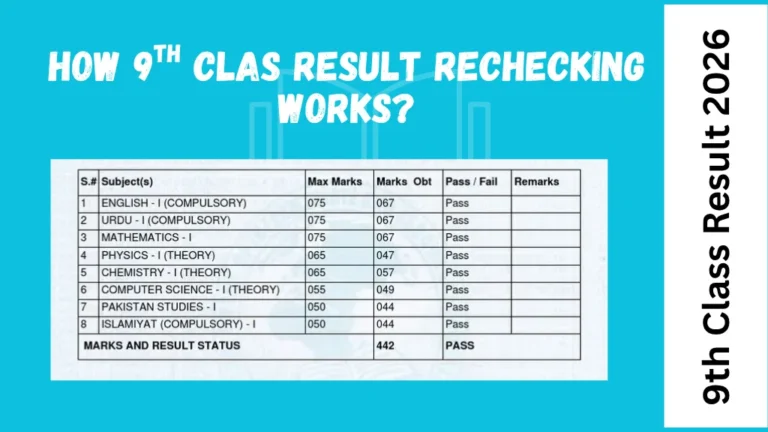
Once you successfully access your result, our guide on how to read a 9th class result card can help you understand the marks, grades and result status shown on it.
Common Problems on 9th Class Result Day
| Problem | What to do |
|---|---|
| Website is slow | Wait and try again |
| Page does not open | Try again later or use another official method |
| Roll number not accepted | Check every digit |
| Result not found | Confirm board, class and year |
| SMS not working | Verify the official SMS code and format |
| Gazette unavailable | Check the board’s official website later |
| Internet is slow | Switch between Wi-Fi and mobile data |
| Browser has a problem | Try another updated browser |
| Result still unavailable | Contact your school or board |
What You Should Not Do
When the result website is busy, avoid making the situation more stressful by following unreliable information.
Do not:
- Enter your personal information on suspicious websites
- Pay someone claiming they can unlock your result
- Use an SMS code from another board
- Assume a website error means you failed
- Keep refreshing the website continuously
- Share your roll number publicly on social media
- Download unknown applications claiming to provide results
Frequently Asked Questions
Why is the 9th class result website not opening?
The website may be experiencing heavy traffic because many students are checking their results at the same time. It can also be a temporary internet or server problem.
What should I do if the board website is busy?
Wait a few minutes and try again. You can also check whether your board provides an official SMS service, gazette or another result-checking method.
Can I check my 9th class result by SMS?
Some boards provide SMS result services. The SMS number and message format vary by board, so use the instructions officially provided by your board.
Can I check my result through a gazette?
If your board publishes a result gazette, you may be able to find your result there. Some boards maintain official online gazette sections, such as BISE Multan.
Does a “result not found” message mean I failed?
No. First check your roll number, board, examination year and class. A technical problem or incorrect information can also cause a result search to fail.
Can I use mobile data to check my result?
Yes. If your Wi-Fi connection is slow, you can try mobile data. However, changing your connection will not solve a problem caused by an overloaded board server.
Should I keep refreshing the website?
No. If the website is overloaded, repeatedly refreshing it is unlikely to help. Wait for some time and try again.
Can I check my result from another website?
You may find result information on other websites, but the educational board’s official result system should remain your primary source for verification.
What if the website is still not working after several hours?
Check the board’s official announcements and available alternative result methods. If the problem continues, contact your school or the relevant board.
What information do I need to check my result?
Your roll number is normally the key information for an online result search. You may also need to select your board, examination and year.
Final Words
A busy board website on 9th Class Result 2026 day is frustrating, but it does not mean that your result is missing. High traffic can temporarily make result portals slow or inaccessible.
The best approach is to wait and try the official website again rather than repeatedly refreshing it. If your board provides an official SMS service, result gazette or another checking method, you can use that option instead.
Most importantly, use the official information provided by your own board because result-checking methods, SMS codes and gazette availability can differ between boards.